CCTV storage planning is an important part of designing a reliable video surveillance system for commercial buildings. Installing security cameras is only one part of the project. Businesses also need enough recording capacity to store footage for an appropriate period, retrieve important incidents quickly and maintain consistent recording quality without running out of disk space. A system with insufficient storage may overwrite valuable footage before an incident is investigated, while an oversized system can increase equipment, energy and maintenance costs unnecessarily.
For commercial properties, the right CCTV storage capacity depends on several technical factors, including the number of cameras, video resolution, frame rate, compression technology, recording schedule, motion activity and required retention period. A warehouse with continuous recording across dozens of cameras will have different storage requirements from a small office using motion-based recording.
In the UAE, CCTV storage planning also needs to consider the building’s operational requirements and applicable security regulations. Commercial offices, shopping centres, hotels, warehouses, healthcare facilities and industrial sites may have different surveillance objectives and retention obligations. Businesses should confirm the applicable requirements with the relevant authority and project stakeholders before finalising the recording design.
Understanding how to calculate CCTV storage requirements helps property owners, security consultants, system integrators and facility managers build surveillance systems that are practical, scalable and suitable for long-term operation.
Why CCTV Storage Planning Matters for Commercial Buildings
A CCTV system is expected to provide usable video evidence when a security incident occurs. However, recording footage is not enough if the system cannot retain it for the necessary period.
For example, a commercial building may experience an incident several days after it happened. If the recording system has already overwritten the footage, security personnel may be unable to investigate the event properly. This can affect internal investigations, insurance claims, workplace safety reviews and other security procedures.
Proper CCTV storage planning helps businesses maintain a suitable recording history while avoiding unnecessary infrastructure costs. It also supports more reliable security operations because the recording platform is designed around the actual surveillance requirements of the property.
Storage capacity affects several parts of a video surveillance system. Network video recorders (NVRs), digital video recorders (DVRs), surveillance hard drives, network-attached storage (NAS), storage servers and video management systems (VMS) all need to work together. The selected infrastructure must support the required number of cameras, incoming video streams, recording schedules and playback activity.
For a large commercial property in Dubai or Abu Dhabi, storage planning should be completed during the surveillance system design stage rather than after cameras have been installed. This makes it easier to coordinate camera specifications, network bandwidth, recording servers, control rooms and future expansion.

Key Factors That Determine CCTV Storage Requirements
There is no single storage figure that works for every commercial building. The required capacity is calculated from several interconnected factors. A small change in one setting can significantly affect the amount of storage consumed over time.
Number of CCTV Cameras
The number of cameras is one of the first details required for a storage calculation. Each camera generates a video stream that must be recorded and retained.
A commercial office may use cameras at entrances, reception areas, corridors, lifts, car parks and loading bays. A warehouse may require additional coverage for storage aisles, goods receiving areas, dispatch zones and perimeter access points.
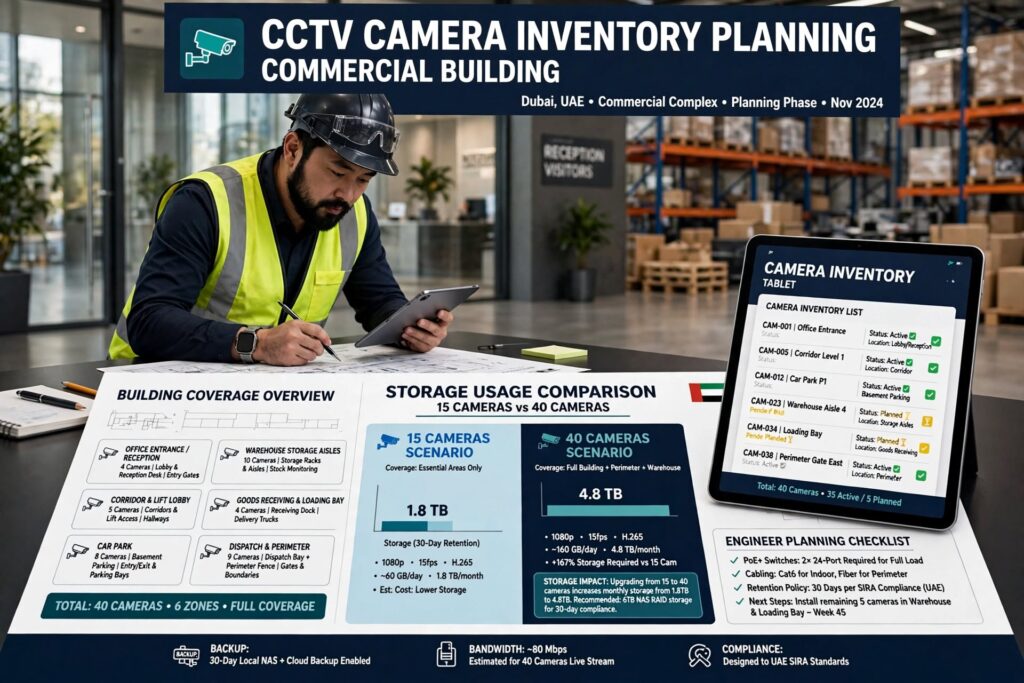
For example, a building with 40 cameras will generally require more recording capacity than a comparable building with 15 cameras, assuming similar recording settings. However, the number of cameras alone does not determine the final storage requirement. Resolution, bitrate and recording schedules also matter.
A camera inventory should identify each device, its location, recording purpose and configuration. This provides a reliable starting point for calculating total storage.
Video Resolution and Image Quality
Resolution describes the number of pixels captured in each video frame. Common CCTV resolutions include 1080p Full HD, 4MP, 5MP, 4K and higher-resolution formats.
Higher resolution generally produces more detailed images, which can help security personnel identify objects, read certain details and investigate incidents. However, higher-resolution footage usually requires more storage when other settings remain comparable.
For example, a 4K camera recording at a high bitrate can consume considerably more storage than a 1080p camera. The actual difference depends on the camera’s encoding settings, scene complexity and compression performance.
Businesses should select resolution according to the purpose of each camera. A camera monitoring a general corridor may not need the same image detail as one covering a payment counter, vehicle entrance or access-control point.
Using the highest available resolution everywhere can increase storage and network requirements without delivering a meaningful improvement in surveillance coverage.
Frame Rate
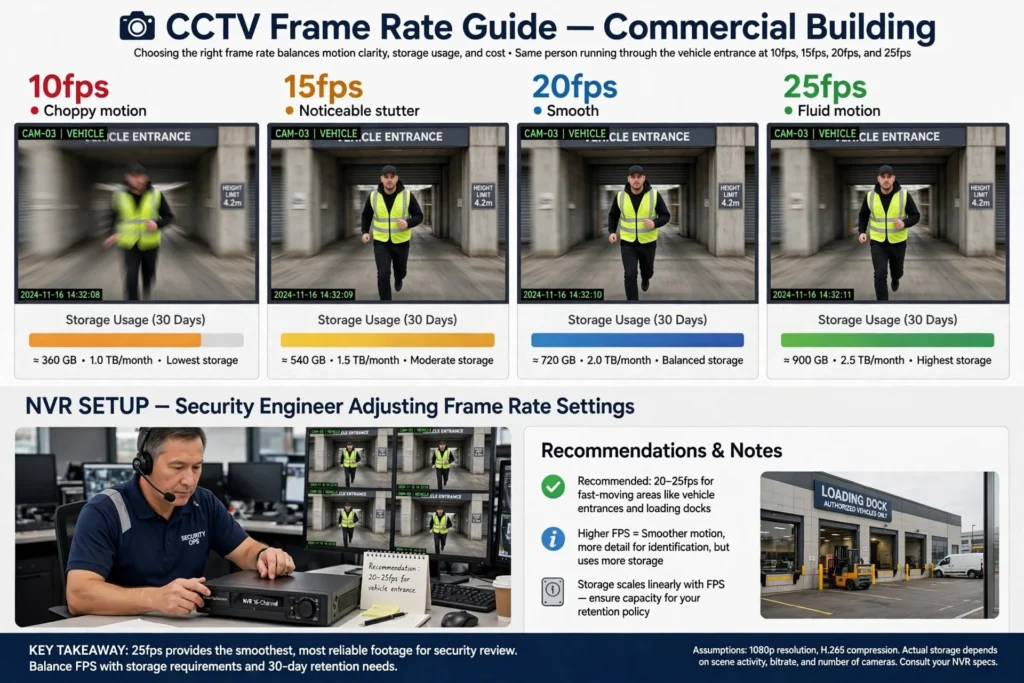
Frame rate is measured in frames per second (FPS). It determines how many individual images a camera captures every second.
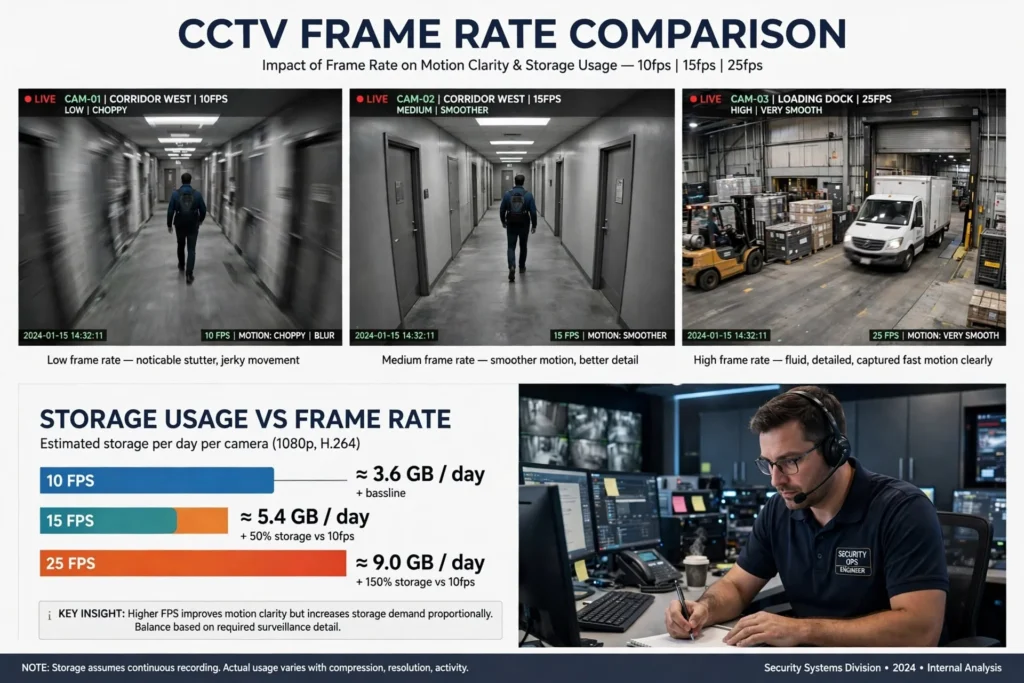
Common commercial CCTV configurations include 10, 15, 20 and 25 FPS, although available options depend on the camera and recording platform.
Higher frame rates can provide smoother footage and help capture fast-moving activity. This may be important in vehicle entrances, loading docks, industrial operations and busy public areas.
However, increasing the frame rate can also increase the bitrate and storage requirement. A camera recording at 25 FPS may use more storage than the same camera recording at 12 FPS if the other settings are comparable.
The correct frame rate should reflect the movement and security purpose of each monitored area rather than applying one maximum setting to every camera.
Video Compression Technology
Video compression reduces the amount of data required to store recorded footage. Modern CCTV systems commonly use H.264, H.265 and, where supported, more advanced encoding technologies such as H.265+.
H.264 is widely supported and remains common in existing surveillance installations. H.265 can achieve similar visual quality at a lower bitrate in suitable conditions, helping reduce storage and bandwidth requirements.
Some manufacturers also offer enhanced compression modes that analyse video activity and optimise encoding. Their actual performance depends on camera settings, scene movement, image quality and compatibility with the recording platform.
For a commercial building with many cameras, selecting an efficient compression format can make a substantial difference to long-term storage costs. However, compatibility must be checked across cameras, NVRs, VMS platforms and playback software.
Businesses should also test recorded footage before enabling aggressive compression. Storage savings should not come at the expense of image clarity needed for security investigations.
Recording Schedule: Continuous or Motion-Based
The recording schedule has a direct effect on storage consumption.
Continuous recording stores video throughout the configured operating period. It is useful where a complete recording history is required, particularly in high-security areas, entrances, cash-handling locations and critical operational zones.
Motion-based recording stores footage when the camera detects movement or when an associated recording rule is triggered. This can reduce storage consumption in areas with long periods of inactivity.
Some systems combine continuous recording with motion-triggered events. For example, a camera may record continuously at a lower frame rate and capture higher-quality event footage when movement is detected.
Motion recording should be configured carefully. Poorly adjusted detection zones, lighting changes, moving trees, reflections and other environmental conditions can trigger unnecessary recordings or cause important events to be missed.
For accurate storage planning, businesses should estimate actual recording activity rather than assuming motion-based recording will always reduce storage by a fixed percentage.
How to Calculate CCTV Storage Requirements
The most practical way to estimate CCTV storage is to calculate the data generated by each camera and multiply it by the number of recording days.
A useful starting point is the average video bitrate. Bitrate measures how much data a camera produces per second and is usually expressed in megabits per second (Mbps).
For a simplified calculation:
Storage per camera per day (GB) = Bitrate (Mbps) × 10.8
This formula provides an approximate daily storage requirement using decimal gigabytes, assuming continuous recording for 24 hours.
To calculate total storage:
Total storage (GB) = Bitrate × 10.8 × Camera Count × Retention Days
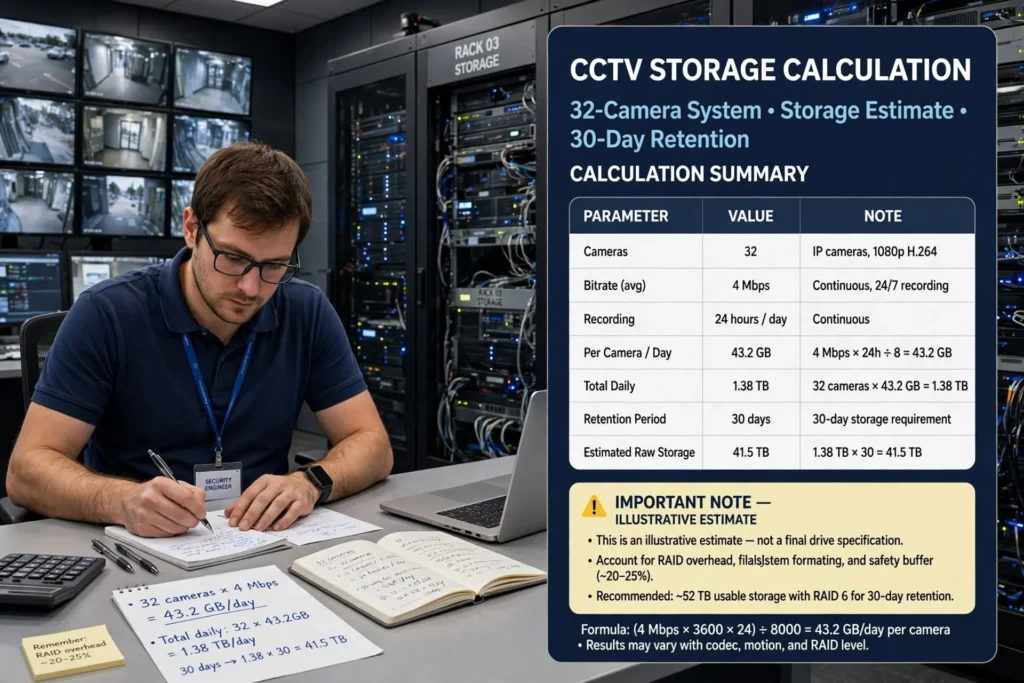
For example, consider a commercial building with 32 cameras, each configured to record at an average bitrate of 4 Mbps continuously.
Daily storage per camera:
4 × 10.8 = 43.2 GB
Daily storage for 32 cameras:
43.2 × 32 = 1,382.4 GB
For a 30-day retention period:
1,382.4 × 30 = 41,472 GB
The estimated requirement is approximately 41.5 TB of raw recording storage.
Example CCTV storage calculation
| Parameter | Example setting |
|---|---|
| Number of cameras | 32 |
| Average bitrate per camera | 4 Mbps |
| Recording schedule | 24 hours daily |
| Daily storage per camera | 43.2 GB |
| Total daily storage | 1.38 TB |
| Retention period | 30 days |
| Estimated raw storage | 41.5 TB |
This is an illustrative estimate, not a final drive specification. Actual capacity planning must account for bitrate variation, usable disk capacity, RAID configuration, system overhead, storage formatting and the recording platform’s requirements.
Calculating Storage for Different Camera Bitrates
Commercial buildings rarely use identical settings for every camera. A more accurate calculation separates cameras into groups according to their average bitrate.
For example:
| Camera group | Cameras | Average bitrate |
|---|---|---|
| Office corridors | 12 | 2 Mbps |
| Building entrances | 8 | 4 Mbps |
| Car park cameras | 6 | 4 Mbps |
| Loading and delivery areas | 4 | 6 Mbps |
| Reception and critical areas | 2 | 6 Mbps |
The daily storage for each group can be calculated separately using the same formula. The resulting figures are then added together and multiplied by the required retention period.
This method is more reliable than multiplying every camera by one assumed bitrate. It also helps security consultants identify which areas are responsible for the highest storage consumption.
Understanding CCTV Retention Periods
The retention period is the length of time recorded footage remains available before the system overwrites or deletes it according to its configured storage policy.
Commercial buildings may require different retention periods depending on their security needs, operational procedures, contracts and applicable regulations.
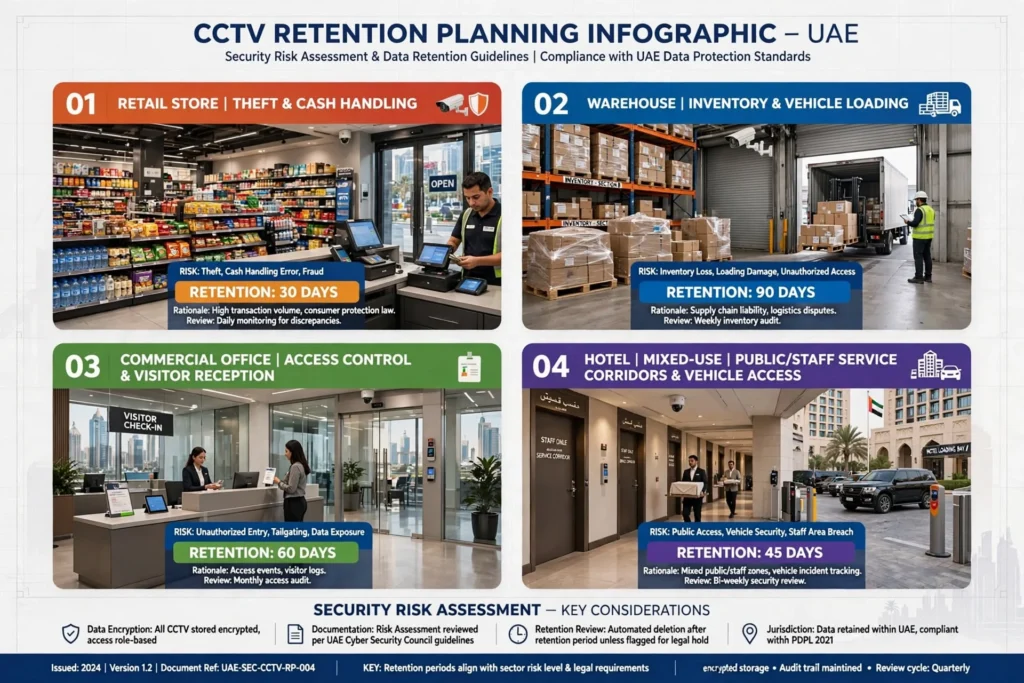
A 7-day recording period may be sufficient for some low-risk internal monitoring applications, while other facilities may need 30, 60 or 90 days, subject to the relevant requirements. These figures are examples for system planning, not universal legal requirements.
In the UAE, businesses should verify the current CCTV requirements applicable to their emirate, property type, business activity and sector. Requirements may differ between Dubai, Abu Dhabi, Sharjah and other jurisdictions. Where a project is subject to SIRA requirements in Dubai or relevant local authority requirements elsewhere, the system design should be checked against the applicable rules and approved specifications.
Retention planning should also consider who needs access to recordings, how incidents are escalated, whether footage must be exported and how long exported evidence is retained.
Factors That Influence Retention Decisions
The appropriate retention period depends on the risk profile and operating requirements of the building.
A retail property may need sufficient footage to investigate theft, customer incidents, delivery disputes and cash-handling issues. A warehouse may need recordings to review inventory discrepancies, vehicle movements, loading operations and workplace incidents.
A commercial office may focus on access control, visitor activity, reception areas and shared facilities. Hotels and mixed-use developments may have more complex surveillance requirements because they contain public areas, staff-only spaces, service corridors and vehicle access points.
The building’s security risk assessment should determine which locations need continuous recording, which need event-based recording and whether selected cameras require a longer retention period.
RAID Configuration and Usable Storage Capacity
The total capacity of installed hard drives is not always the same as the capacity available for CCTV recordings.
Commercial recording systems may use RAID (Redundant Array of Independent Disks) to improve fault tolerance or performance. RAID combines multiple physical drives into a logical storage arrangement, but some configurations reserve capacity for redundancy.
Common configurations include:
- RAID 0: Combines drives for performance and capacity but provides no disk redundancy.
- RAID 1: Mirrors data across drives, reducing usable capacity but providing protection against a single drive failure in the mirror.
- RAID 5: Uses distributed parity and generally requires at least three drives, with capacity equivalent to one drive used for parity.
- RAID 6: Uses dual parity and generally requires at least four drives, with capacity equivalent to two drives used for parity.
- RAID 10: Combines mirroring and striping, offering performance and redundancy with a larger capacity trade-off.
The appropriate configuration depends on the recording platform, number of drives, performance requirements and business continuity needs.
RAID is not a backup. It does not protect against every failure, including accidental deletion, malware, theft, fire or damage to the entire recording system. Critical facilities should consider separate backup or replication arrangements where required.
When specifying a CCTV storage system, calculate the usable recording capacity after RAID overhead rather than relying on the sum of the drive labels.
Choosing the Right CCTV Storage Infrastructure
Different commercial buildings require different storage architectures. The decision should consider camera count, retention requirements, system availability, network design, scalability and maintenance.
Network Video Recorders (NVRs)
An NVR is commonly used in IP CCTV systems. It receives network video streams from IP cameras and stores recordings on installed hard drives or supported external storage.
NVRs are suitable for many small and medium-sized commercial installations. They are available in different channel capacities and storage configurations.
Before selecting an NVR, check the maximum supported recording bandwidth, number of camera channels, drive capacity, supported compression formats and RAID options. A recorder with enough camera channels may still be unsuitable if its incoming bandwidth or storage performance is insufficient.
Dedicated Storage Servers
Large commercial buildings may require dedicated recording servers or centralised storage infrastructure. These systems can support larger camera deployments, multiple recording servers and integration with video management software.
A server-based architecture can be appropriate for shopping centres, industrial facilities, airports, hospitals and large mixed-use developments.
The design should consider storage controller performance, network throughput, server redundancy, cooling, power protection and the number of simultaneous recording and playback streams.
Network-Attached Storage (NAS)
NAS systems provide shared storage over a network and can support certain CCTV platforms. They may be useful where a business needs centralised capacity or wants to expand beyond the internal drive limits of an NVR.
However, compatibility and recording performance must be confirmed before deployment. Not every NAS device is designed for continuous CCTV workloads, and network bottlenecks can affect recording reliability.

Cloud and Hybrid CCTV Storage
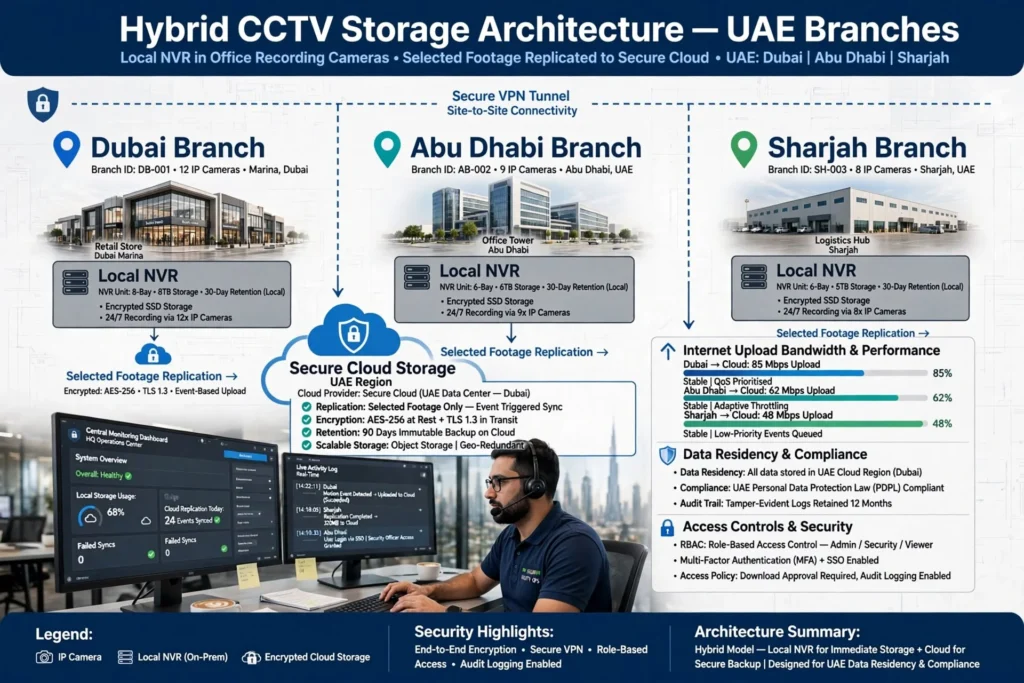
Cloud video storage can provide off-site access and additional resilience, depending on the service architecture. It may be useful for businesses with multiple branches or remote monitoring requirements.
However, cloud recording depends on internet connectivity, upload bandwidth, service costs, data governance and the provider’s retention policies.
A hybrid approach combines local recording with selected cloud storage or off-site replication. This can provide local access to recordings while keeping important footage in a separate location.
Businesses should evaluate data residency, access controls, encryption, privacy obligations and contractual terms before transferring surveillance footage to a cloud service.
CCTV Storage Planning for Different Commercial Properties in the UAE
Commercial buildings in the UAE have varied operating conditions and surveillance requirements. Storage should be designed according to the activities taking place in each facility.
Office Buildings in Dubai and Abu Dhabi
Corporate offices commonly monitor reception areas, entrances, lift lobbies, parking facilities, corridors and selected operational spaces.
Storage calculations should distinguish between general monitoring cameras and cameras covering critical access points. Recording schedules may also differ between business hours and periods when the office is closed.
For multi-tenant buildings, responsibilities for footage access and retention should be clearly defined between building management, security contractors and tenants.
Shopping Centres and Retail Properties
Shopping centres in Dubai, Sharjah and Abu Dhabi can have extensive surveillance networks covering entrances, retail corridors, parking areas, loading bays and service zones.
Busy public areas may generate more complex video scenes, affecting average bitrate and storage use. Cameras covering payment points, entrances and high-traffic areas may require higher recording settings than cameras monitoring less active spaces.
The storage design should also account for incident retrieval workflows, as security teams may need to search footage across multiple cameras and time periods.
Warehouses and Industrial Facilities
Warehouses in Jebel Ali, Dubai Industrial City, Al Quoz and other industrial areas may require cameras covering goods receiving, dispatch, inventory storage, vehicle movement and perimeter security.
Loading and dispatch zones often contain continuous movement, which can increase video bitrate. Storage calculations should use realistic estimates for these active scenes rather than applying low-motion assumptions.
Industrial facilities may also require integration between CCTV, access control, perimeter detection and other security systems. The recording architecture should support the required event markers and retrieval procedures.
Hotels and Hospitality Properties
Hotels have complex surveillance environments, including entrances, reception areas, car parks, service corridors and back-of-house operations.
Storage planning should reflect the different purposes of these cameras while respecting privacy requirements. Camera placement and recording policies should be reviewed carefully, especially in areas where people have a reasonable expectation of privacy.
Healthcare and Institutional Buildings
Hospitals, clinics and educational facilities may use CCTV for access monitoring, perimeter protection and selected public areas.
Their storage policies should be coordinated with privacy, data protection, operational and sector-specific requirements. A longer retention period should not be adopted automatically without confirming its necessity and compliance implications.
Network Bandwidth and Storage Must Be Planned Together
CCTV storage is only one part of the recording infrastructure. Every IP camera also sends video data across the network.
For example, 40 cameras each transmitting at 4 Mbps create an aggregate incoming video bitrate of approximately 160 Mbps before additional network overhead. The network must handle this traffic reliably, particularly where cameras connect through multiple switches and uplinks.
A well-designed CCTV network should consider:
- Gigabit or higher-capacity network links where appropriate.
- Managed PoE switches for camera connectivity.
- VLAN segmentation for surveillance devices.
- Fibre-optic uplinks between building sections where required.
- Network bandwidth for recording and simultaneous playback.
- UPS protection for critical network and recording equipment.
- Secure remote access for authorised users.
In large buildings, network design should be coordinated with the CCTV storage architecture. A system may have sufficient hard drive capacity but still lose footage if the network cannot reliably deliver all camera streams to the recording server.

Common CCTV Storage Planning Mistakes
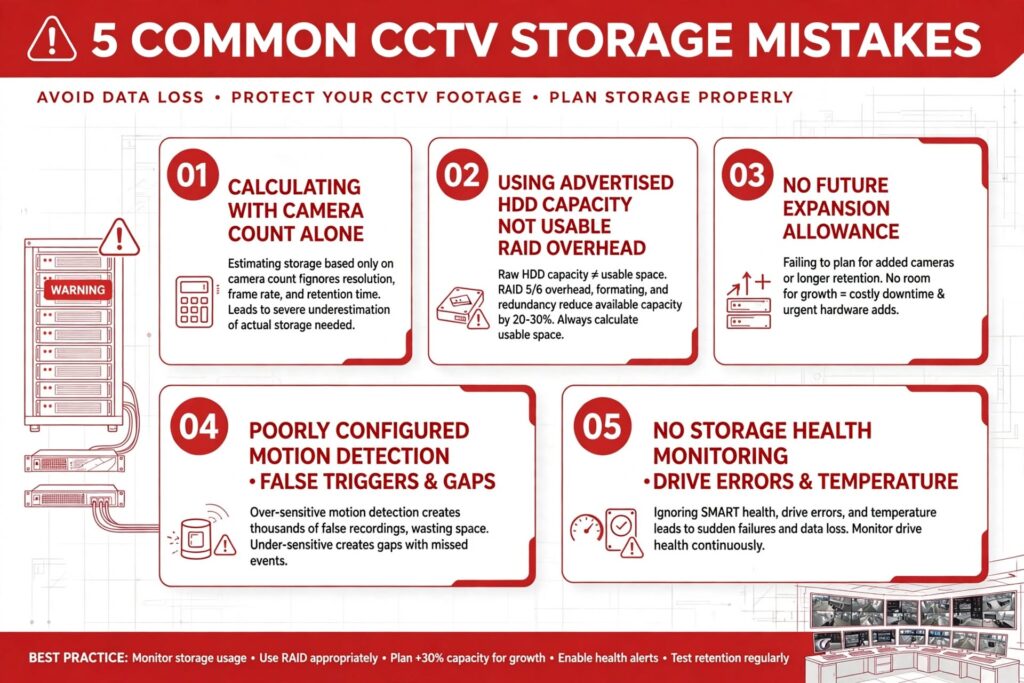
One common mistake is calculating storage using camera count alone. Two buildings with the same number of cameras can have very different storage requirements because of differences in resolution, bitrate, frame rate and recording activity.
Another mistake is using the maximum advertised hard drive capacity as the available recording space. RAID overhead, formatting and system reserves reduce usable capacity.
Some businesses also overlook future expansion. If a building adds cameras, increases resolution or changes its retention policy, the original storage design may become inadequate. A reasonable expansion allowance should be included in the project specification.
Poorly configured motion detection can also cause storage problems. Excessive false triggers increase recording volume, while missed triggers can leave gaps in important footage.
Finally, businesses sometimes overlook storage health monitoring. Surveillance hard drives operate under continuous workloads and should be monitored for errors, temperature and performance. Regular checks help identify potential failures before they affect recording availability.
A Practical CCTV Storage Planning Checklist
Before approving a commercial CCTV storage design, project teams should review the following:
| Planning area | What to verify |
|---|---|
| Camera inventory | Total cameras, locations and purposes |
| Resolution | Required image detail for each area |
| Frame rate | Suitable FPS for expected movement |
| Bitrate | Realistic average bitrate per camera |
| Compression | Supported and tested video codec |
| Recording mode | Continuous, motion-based or hybrid |
| Retention period | Business and regulatory requirements |
| Storage capacity | Calculated raw and usable capacity |
| RAID design | Fault tolerance and capacity trade-offs |
| Network | Camera bandwidth and uplink capacity |
| Power protection | UPS and backup power requirements |
| Scalability | Allowance for future cameras and retention |
| Monitoring | Drive health and recording failure alerts |
| Security | Access control, encryption and audit logs |
| Privacy | Camera placement and footage handling policies |
This checklist helps consultants, contractors and building operators review the complete recording environment instead of focusing only on the hard drive specification.
Working With a CCTV Storage Planning Supplier
Selecting the correct storage capacity requires coordination between CCTV cameras, recording equipment, network infrastructure and operational requirements. A specialist supplier can help assess the project scope, review camera specifications and recommend suitable recording and storage components.
For commercial projects, businesses should work with a CCTV Storage Planning Supplier that understands IP surveillance systems, NVR capacity, surveillance-grade hard drives, RAID configurations, video compression and retention calculations.
The supplier should be able to explain how the proposed storage capacity was calculated, distinguish raw capacity from usable capacity and confirm compatibility between cameras, recorders and storage devices.
For projects in Dubai, Abu Dhabi, Sharjah and other UAE locations, the system specification should also be reviewed against applicable local security requirements. This is particularly important for commercial developments, industrial facilities, retail properties and multi-building projects.
A properly planned solution should include clear documentation covering camera quantities, average bitrates, recording schedules, retention assumptions, usable capacity, redundancy arrangements and future expansion. These details make it easier for facility managers to maintain the system and understand when additional storage will be required.
Maintaining CCTV Storage Performance Over Time
CCTV storage planning should continue after installation. Recording systems need regular maintenance to confirm that all cameras are recording correctly and that storage capacity remains sufficient.
Facility managers should review disk health reports, recorder alerts, storage utilisation and recording gaps. They should also verify that playback and footage export functions work as expected.
Periodic reviews are important when a business changes its surveillance requirements. Adding cameras, upgrading from Full HD to 4K, increasing frame rates or extending retention periods can significantly increase storage consumption.
It is also important to review user permissions. Only authorised personnel should be able to access, export or delete recorded footage. Strong passwords, secure network segmentation, firmware updates and audit logs help protect surveillance infrastructure from unauthorised access.
Businesses should establish documented procedures for incident footage. These procedures should explain how recordings are identified, exported, securely stored and shared with authorised parties. Retention and deletion policies should be consistent with applicable privacy and legal requirements.

Designing a Reliable CCTV Storage System for Commercial Buildings
Effective CCTV storage planning is about more than choosing hard drives with a large capacity. It requires an understanding of camera specifications, video bitrate, compression, recording schedules, retention requirements, network bandwidth and storage redundancy.
By calculating the data generated by each camera and reviewing the operational needs of the building, businesses can avoid insufficient storage, reduce unnecessary infrastructure costs and maintain access to important recordings.
Whether the project involves an office tower in Dubai, a warehouse in Jebel Ali, a retail property in Abu Dhabi or an industrial facility in Sharjah, the storage design should be based on actual surveillance requirements and applicable regulations.
A well-planned CCTV system gives security teams reliable access to recorded footage, supports incident investigations and provides a scalable foundation for future building security requirements.