CCTV storage planning is an important part of designing a reliable video surveillance system for commercial buildings. A security system may include dozens or hundreds of cameras, but without sufficient storage capacity, recorded footage may be overwritten before security teams can review it. This can create problems during theft investigations, access disputes, workplace incidents, insurance claims, and compliance reviews.
Commercial properties in Dubai and across the UAE have different surveillance requirements depending on their size, security risks, operating hours, camera coverage, and applicable regulations. A warehouse in Jebel Ali, a retail shop in Deira, an office tower in Business Bay, and a hotel in Dubai Marina may all require different recording and retention strategies.
Effective CCTV storage planning helps businesses calculate how much storage they need, select suitable recording equipment, control infrastructure costs, and maintain access to important footage. It also helps security teams avoid unnecessary storage purchases while ensuring that recording settings support the intended retention period.
What Is CCTV Storage Planning?
CCTV storage planning is the process of estimating, allocating, and managing the digital storage required to retain surveillance footage for a specified period. It considers camera resolution, video bitrate, frame rate, compression technology, recording schedules, motion activity, the number of cameras, and the required retention period.
Most commercial surveillance systems use a Network Video Recorder (NVR), Digital Video Recorder (DVR), or video management system (VMS) connected to dedicated storage drives. Larger installations may use network-attached storage (NAS), storage area networks (SAN), or distributed recording servers.
The purpose is to make sure the system can store the required footage without interruption. Storage planning should take place before cameras and recording equipment are purchased because storage requirements directly affect recorder capacity, drive configuration, network infrastructure, power consumption, and the total cost of the surveillance project.
For businesses operating in Dubai, Sharjah, Abu Dhabi, and other UAE locations, planning should also consider the applicable security requirements and the operational needs of each property.
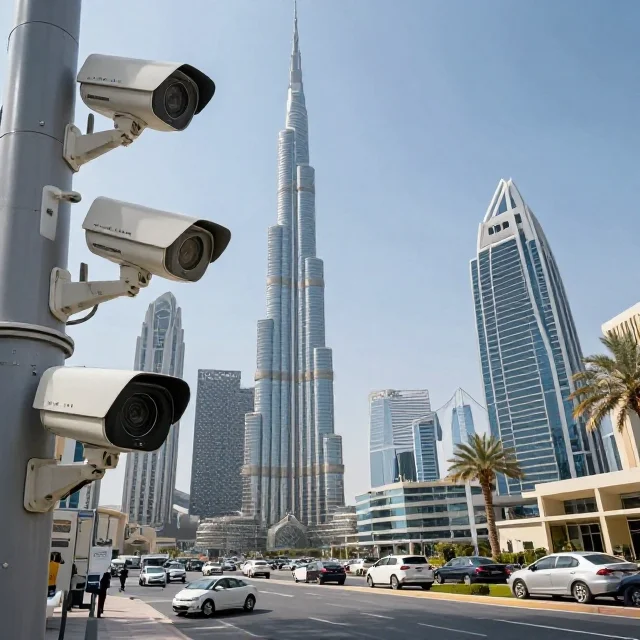
Why Commercial Buildings Need Accurate CCTV Storage Calculations
Commercial buildings generate different amounts of video data depending on their surveillance coverage and daily activity. A small office with eight cameras may have relatively modest requirements, while a logistics facility with 150 cameras can generate several terabytes of footage every day.
Insufficient storage can cause older recordings to be overwritten sooner than expected. This becomes a serious issue when an incident is discovered several days after it occurred. Security personnel may find that the footage they need is no longer available.
Excessive storage creates another problem. Purchasing too many hard drives, servers, and backup systems increases capital expenditure, rack space, cooling requirements, and maintenance costs. Accurate calculations help businesses find a practical balance between retention requirements, image quality, and available budgets.
Storage planning is particularly important for shopping malls, hospitals, hotels, schools, office towers, factories, parking facilities, and warehouses. These properties often have different recording priorities for entrances, cash-handling areas, loading bays, lifts, corridors, plant rooms, and restricted-access zones.
Key Factors That Determine CCTV Storage Requirements
Number of CCTV Cameras
The number of cameras is one of the first inputs required for a storage calculation. Each camera contributes video data to the recording system, although individual cameras may use different settings.
A commercial building might use 4 MP cameras in corridors, 8 MP cameras at critical entrances, and lower-resolution cameras for less sensitive areas. Cameras with higher bitrates generally require more storage than cameras configured for lower bitrates.
For this reason, calculating storage from the total camera count alone is not sufficient. The calculation should use the expected bitrate for each camera or camera group.
Camera Resolution and Image Detail
Resolution describes the number of pixels used to create a video image. Common CCTV resolutions include 2 MP Full HD, 4 MP, 5 MP, and 8 MP 4K.
Higher resolutions can provide more image detail for identifying people, reading vehicle registration plates, and reviewing incidents. However, they may also generate larger video files, depending on the scene, frame rate, compression settings, and encoder configuration.
A 4K camera does not necessarily use exactly twice the storage of a 4 MP camera. Actual storage depends on the bitrate selected by the installer and the complexity of the recorded scene.
Businesses should choose resolution according to the purpose of each camera. Entrances, vehicle access points, cash areas, and critical operational zones may require greater detail than general circulation spaces.
Video Bitrate
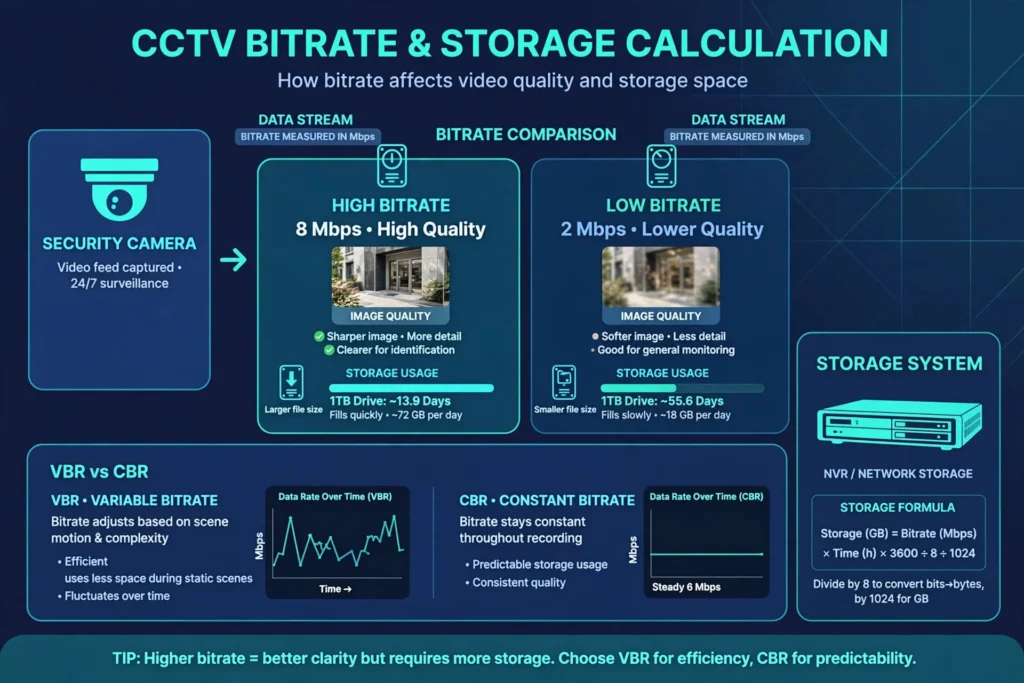
Bitrate is one of the most useful values for calculating CCTV storage. It measures how much video data a camera produces per second and is commonly expressed in megabits per second (Mbps).
Higher bitrates generally produce better image quality, but they also increase storage consumption. Lower bitrates reduce storage requirements, although aggressive reductions can make fast movement, fine details, and low-light footage more difficult to analyse.
For reliable calculations, use the expected configured bitrate rather than relying only on the camera’s advertised resolution. Where possible, check the camera settings, manufacturer’s bitrate recommendations, and actual recording performance during a site test.
Variable bitrate (VBR) recording can use less storage during quiet scenes and more during complex scenes. Constant bitrate (CBR) recording aims to maintain a more consistent data rate. For VBR systems, a realistic average bitrate and an appropriate allowance for busy periods help produce more dependable estimates.
Frame Rate
Frame rate is measured in frames per second (FPS). Higher frame rates provide smoother motion and may be valuable in busy entrances, vehicle lanes, production areas, and locations where rapid movements must be reviewed.
A camera recording at 25 FPS can generate more data than the same camera recording at 10 FPS if other settings remain comparable. However, the storage difference depends on the camera’s encoder and configured bitrate.
The correct frame rate should match the operational purpose. Recording every camera at the highest possible frame rate can increase storage costs without providing a meaningful benefit in every area.
Video Compression Technology
Video compression reduces the amount of data required to store footage. Common surveillance codecs include H.264, H.265, and, on some systems, H.265+ or other manufacturer-specific enhanced compression modes.
H.265 can often provide better compression efficiency than H.264 at comparable visual quality. The actual savings depend on the scene, encoder implementation, bitrate settings, and recording conditions. Enhanced compression modes may also require compatible cameras and recorders.
Before selecting a codec, confirm compatibility across the cameras, NVR, VMS, playback software, and any export workflow. Security teams must be able to review and export recordings when needed.
Recording Schedule and Retention Period
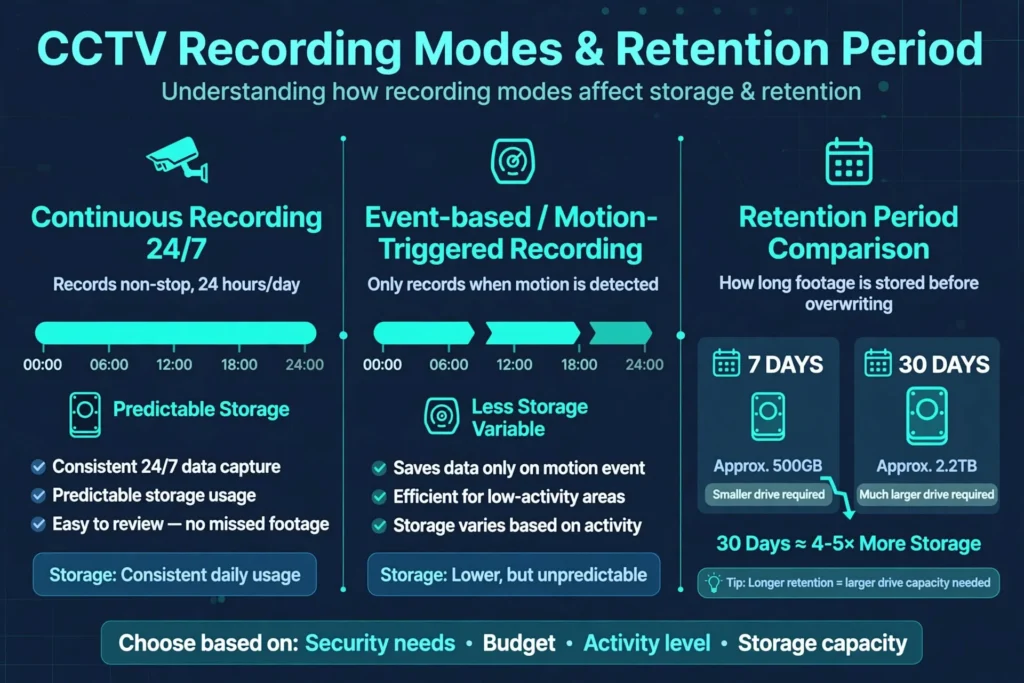
Continuous recording captures footage throughout the day, while event-based recording saves footage when motion or another configured event is detected. Some systems combine continuous recording with motion-triggered recording at a higher frame rate or quality level.
Continuous recording is generally easier to estimate because the recording duration is predictable. Motion-based recording can reduce storage requirements, but savings vary with occupancy, lighting changes, moving equipment, weather, and the accuracy of motion detection.
The retention period is the number of days footage must remain available. A 30-day retention target requires significantly more storage than a 7-day target when other settings are unchanged. The appropriate period should be established through the business’s security objectives and any applicable regulatory or contractual requirements.
How to Calculate CCTV Storage Requirements
The most practical starting point is to calculate storage from the combined recording bitrate of all cameras.
For a camera recording continuously, the approximate storage formula is:
Storage in GB = Bitrate in Mbps × 10.8 × Recording Hours per Day × Retention Days
This formula estimates decimal gigabytes using the bitrate in megabits per second. To calculate the total for several identical cameras, multiply the result by the number of cameras.
For a mixed camera system, calculate storage separately for each group and then add the results together.
Example: Calculating Storage for a Commercial Building
Consider an office building in Business Bay, Dubai, with 32 cameras. Assume each camera uses an average recording bitrate of 4 Mbps and records continuously for 24 hours a day. The required retention period is 30 days.
The calculation is:
Storage per camera = 4 × 10.8 × 24 × 30
Storage per camera = 31,104 GB, or approximately 31.1 GB.
Important correction: The formula above uses a multiplier of 10.8, which converts Mbps to decimal gigabytes per hour. Therefore, the per-camera result is 31.1 GB, not 31,104 GB. The total for 32 cameras is:
31.104 GB × 32 = approximately 995.3 GB.
Adding a 20% planning allowance gives approximately 1.19 TB of estimated usable recording capacity.
This example illustrates why units must be checked carefully. A storage estimate that is off by a factor of 1,000 can lead to a completely unsuitable recorder or hard-drive specification.
The 20% allowance is an example, not a universal requirement. The final allowance should reflect measured bitrate variation, system overhead, growth plans, and the usable capacity of the selected storage configuration.
Quick Storage Reference for Continuous Recording
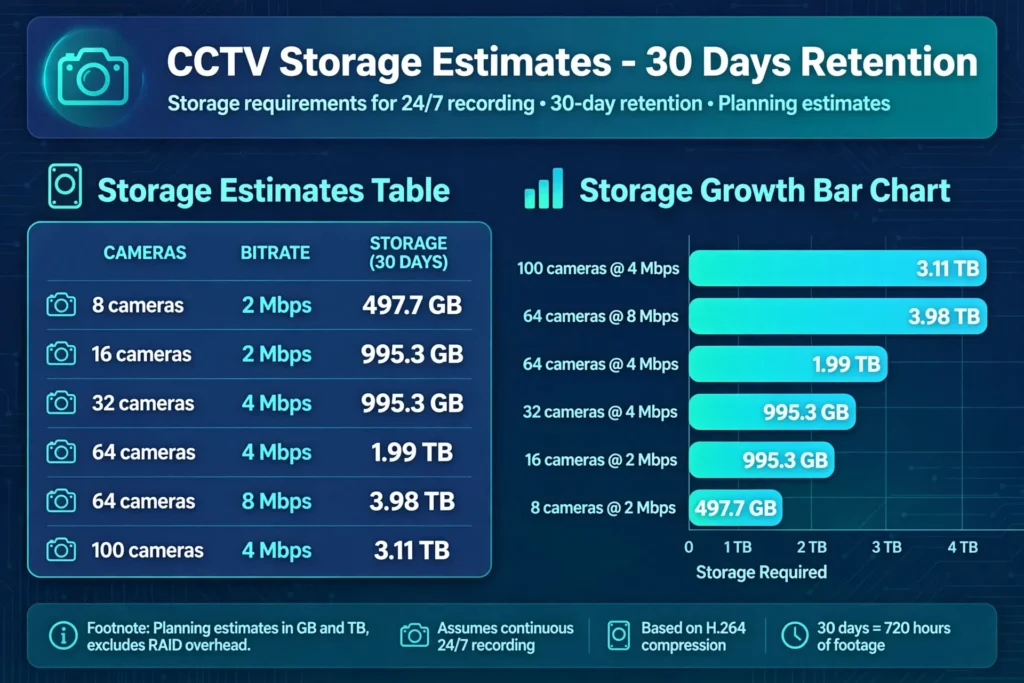
The following estimates assume all cameras operate at the same average bitrate, record 24 hours a day, and use decimal GB and TB. They exclude additional capacity allowances and any reduction in usable space caused by RAID or system configuration.
| Camera setup | Approximate storage for 30 days |
|---|---|
| 8 cameras at 2 Mbps | 497.7 GB |
| 16 cameras at 2 Mbps | 995.3 GB |
| 32 cameras at 4 Mbps | 995.3 GB |
| 64 cameras at 4 Mbps | 1.99 TB |
| 64 cameras at 8 Mbps | 3.98 TB |
| 100 cameras at 4 Mbps | 3.11 TB |
These values are planning estimates rather than guaranteed recorder requirements. Actual storage consumption should be verified against the configured camera bitrates and recording schedule.
Calculating Storage for Motion-Based Recording
Motion-based recording can reduce the amount of footage stored, particularly in locations that remain quiet for long periods. However, it should not be treated as a guaranteed percentage reduction.
For example, if a camera records continuously for 24 hours but motion-based recording produces an average of eight recorded hours per day, its estimated storage requirement would be one-third of the continuous-recording estimate, assuming the same bitrate during those hours.
The calculation becomes:
Storage = Bitrate × 10.8 × 8 hours × Retention Days.
Actual recorded hours may be much higher in busy retail environments or industrial areas. Businesses should test motion settings during representative operating periods and verify that the system does not miss important activity.
Choosing the Right CCTV Storage Hardware
NVR and DVR Storage
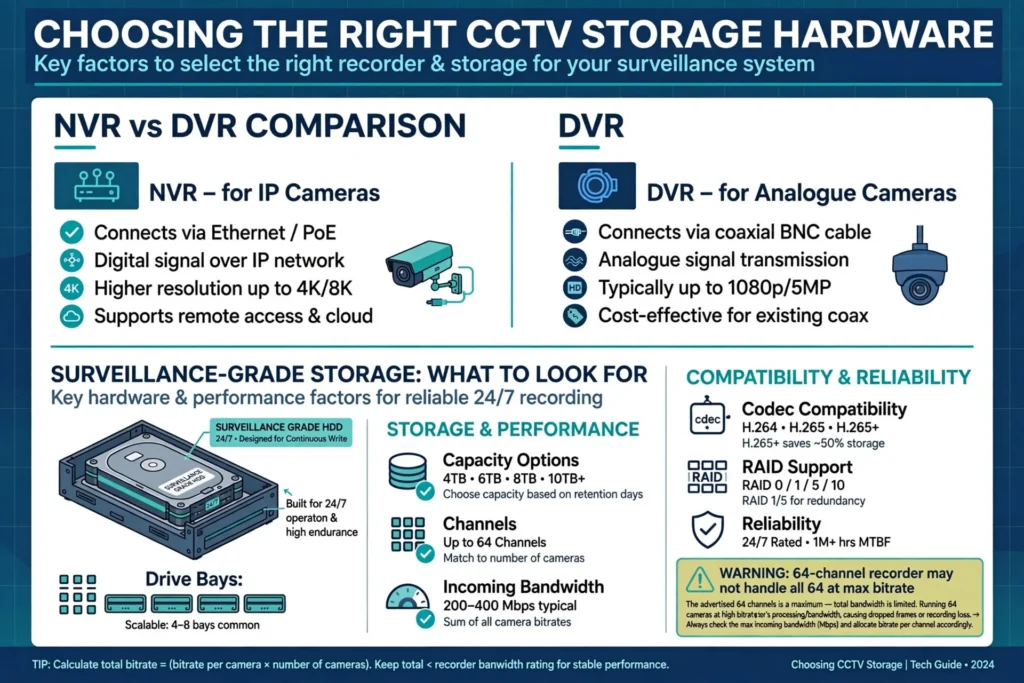
A Network Video Recorder is commonly used with IP cameras, while a Digital Video Recorder is generally associated with analogue CCTV cameras connected through compatible video infrastructure.
Recorder selection should account for the number of supported channels, incoming bandwidth, recording resolution, drive bays, maximum supported drive capacity, codec compatibility, and remote playback requirements.
A recorder advertised as supporting 64 cameras may not be able to record all 64 at the highest resolution and bitrate simultaneously. Incoming bandwidth and processing limitations must be checked before installation.
Surveillance-Grade Hard Drives
Commercial CCTV systems should use drives designed and rated for the relevant surveillance workload. These drives are intended for sustained recording and may support multiple video streams operating continuously.
Drive capacity should be calculated from the required usable storage, not simply the sum of the capacities printed on the drive labels. Recorder operating requirements, RAID configuration, spare capacity, and future expansion can reduce the space available for recordings.
For larger installations, check the manufacturer’s supported drive list and the recorder’s limits on total storage capacity.
RAID, NAS, and Enterprise Storage
RAID configurations can provide fault tolerance or performance benefits, depending on the selected RAID level. However, RAID is not a substitute for backup, and some usable capacity is sacrificed to redundancy.
Network-attached storage (NAS) can support centralised storage for compatible surveillance platforms. Larger facilities may use storage area networks (SANs), recording servers, or distributed storage architectures to handle substantial camera counts.
The appropriate design depends on availability requirements, recovery objectives, expansion plans, network performance, and the consequences of losing recordings. A system that protects against one drive failure may still be vulnerable to recorder failure, accidental deletion, ransomware, fire, or physical damage.
Cloud and Hybrid CCTV Storage
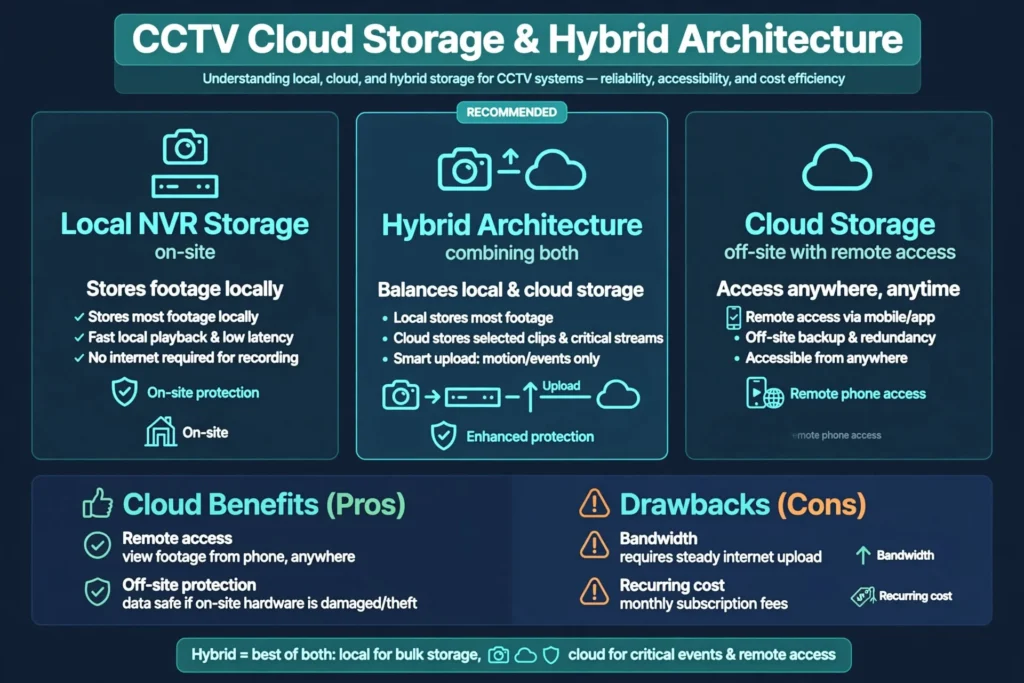
Cloud storage can support off-site retention, remote access, and protection against some on-site incidents. However, uploading continuous high-resolution footage from many cameras may require significant internet bandwidth and recurring service costs.
A hybrid architecture stores most footage locally and transfers selected clips, event recordings, or critical camera streams to a cloud service. This can help businesses balance local recording performance with off-site protection.
Before using cloud storage, evaluate upload capacity, connectivity resilience, data location, access controls, subscription costs, retention settings, and applicable privacy or data-handling requirements.
CCTV Storage Planning for Different Commercial Properties in the UAE
Offices and Commercial Towers
Office buildings in Business Bay, DIFC, Downtown Dubai, and Abu Dhabi’s commercial districts may monitor reception areas, lift lobbies, corridors, entrances, parking levels, and restricted-access rooms.
Storage planning should consider occupancy patterns, after-hours access, visitor management, and the level of detail needed for incident reviews. Cameras covering critical access points may require different settings from those monitoring general corridors.
Retail Stores and Shopping Malls
Retail premises in Deira, Bur Dubai, Dubai Marina, and major shopping destinations may need coverage for entrances, checkout counters, stockrooms, loading areas, and customer circulation spaces.
Busy scenes can increase bitrate demand, particularly when many people move through the frame. Camera positioning and lighting should be reviewed alongside storage capacity because footage that lacks useful detail can undermine the value of even a large recording system.
Warehouses and Industrial Facilities
Warehouses in Jebel Ali, Dubai Industrial City, Sharjah Industrial Areas, and other logistics locations may use cameras at loading docks, perimeter gates, vehicle routes, inventory zones, and production lines.
Large facilities can have long operating hours and wide surveillance coverage. Storage calculations should account for outdoor lighting changes, vehicle movement, continuous production activity, and the need to investigate incidents after a delay.
Hotels, Hospitals, and Educational Buildings
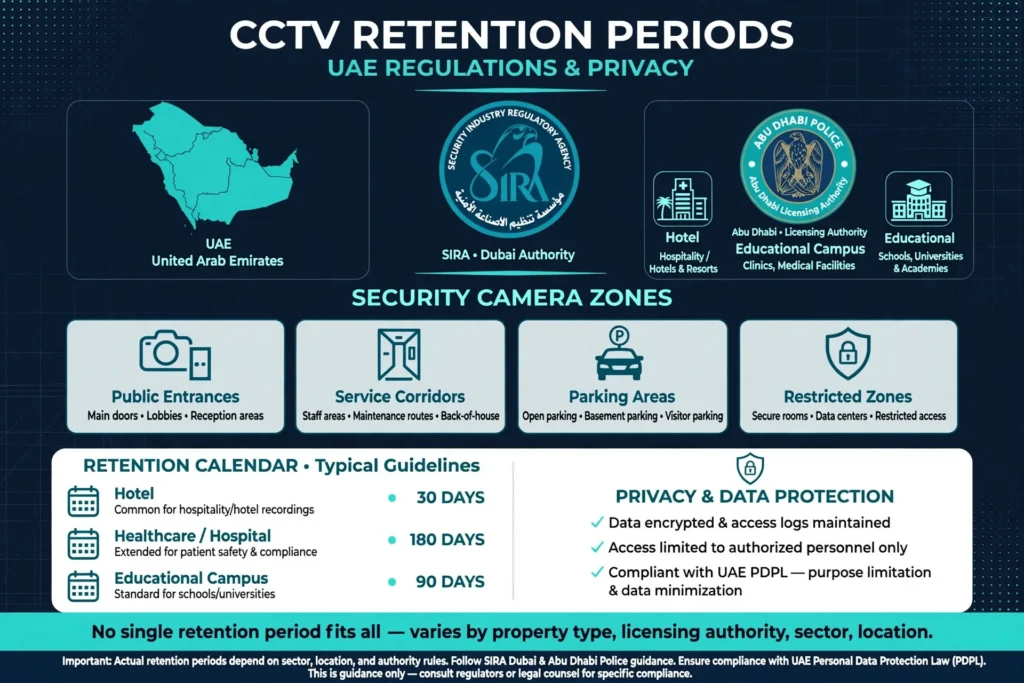
Hotels, healthcare facilities, and educational campuses have different security and privacy considerations. Surveillance may cover public entrances, service corridors, parking areas, and designated restricted zones.
Storage schedules should reflect the purpose of each camera, access permissions, retention requirements, and the sensitivity of the footage. Cameras should not be placed or configured in ways that violate privacy expectations or applicable rules.
Retention Periods, UAE Regulations, and Privacy
There is no single retention period that should automatically be applied to every commercial building in the UAE. Requirements can vary by property type, licensing authority, sector, location, and the applicable security framework.
Businesses should confirm current requirements with the relevant authority, such as the Security Industry Regulatory Agency (SIRA) for applicable Dubai security-system requirements, the competent Abu Dhabi authorities, or the relevant authority in another emirate. Requirements may also arise from sector-specific rules, contractual obligations, or an organisation’s internal security policies.
The retention schedule should be documented and approved before installation. It should define which cameras are covered, how long footage is retained, who can view or export recordings, and when footage is securely deleted or overwritten.
Privacy and data protection also matter. Access to surveillance recordings should be limited to authorised personnel, supported by strong authentication and audit logs where available. Businesses should avoid retaining footage longer than necessary for the documented purpose unless a legal, regulatory, or incident-related requirement applies.
For projects involving multiple emirates, confirm the requirements relevant to each site instead of assuming that one approval or retention policy automatically applies everywhere.
Common CCTV Storage Planning Mistakes
One common mistake is calculating storage using resolution alone. Two cameras with the same resolution may produce different data rates because of different frame rates, codecs, lighting conditions, and bitrate settings.
Another mistake is ignoring continuous recording hours. A system that records all day requires more storage than one configured to record during a limited operating schedule, even when camera settings are identical.
Some businesses also overlook usable capacity. RAID protection, formatting, system reservations, and recorder limitations can make available recording space lower than the total advertised drive capacity.
Poor motion detection settings can cause missing footage or unnecessary recording. Excessive compression may also reduce the detail needed to identify people, objects, or vehicle registration plates. Storage reduction should never compromise the purpose of the surveillance system.
Finally, failing to test playback and export can create problems when evidence is required. A well-planned installation should verify that authorised staff can find recordings, review them, and export usable clips within the system’s supported workflow.
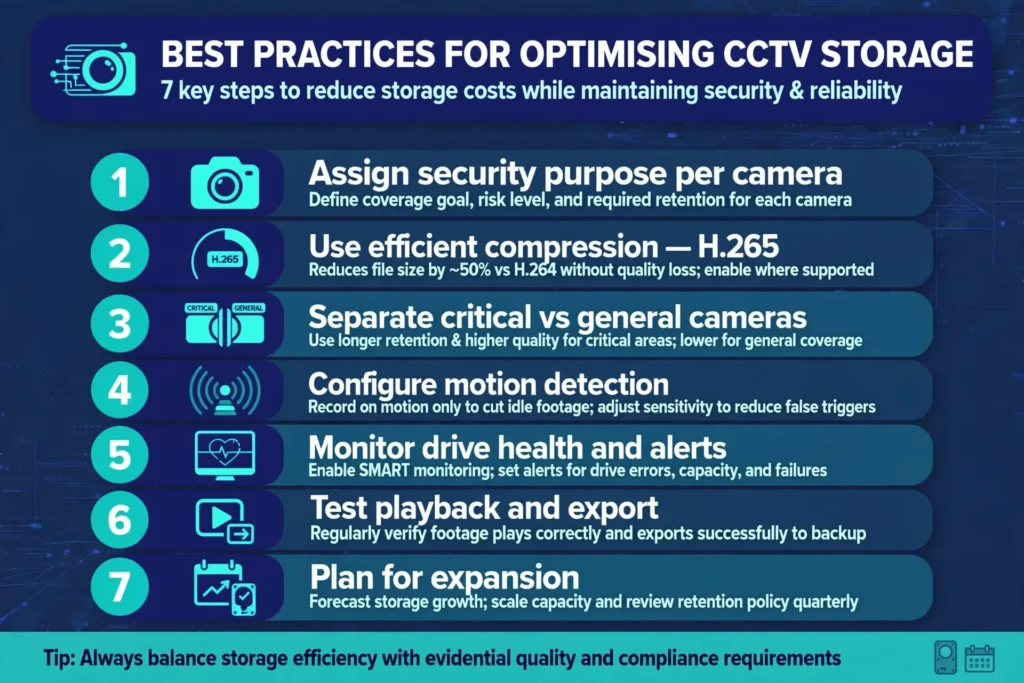
Best Practices for Optimising CCTV Storage
Start by assigning a security purpose to each camera. This helps determine the required resolution, frame rate, bitrate, and retention period instead of applying identical settings to every camera.
Use efficient compression where compatible with the cameras and recorder, but verify image quality under realistic conditions. Review sample recordings during daylight, at night, during busy periods, and in low-light areas.
Separate critical cameras from general monitoring cameras when their retention or quality requirements differ. Use realistic recording schedules, and configure motion detection carefully where event-based recording is appropriate.
Monitor drive health, recording status, free capacity, and unexpected bitrate increases. Configure system alerts for camera disconnections and storage failures where supported. Periodically test playback, clip export, time synchronisation, and access permissions.
Allow for planned camera expansion. If a building may add cameras to a new floor, parking area, warehouse extension, or reception zone, include that expected growth in the storage and recorder design.
For organisations evaluating professional CCTV Storage Planning Service, the most useful starting point is a camera inventory, the intended retention period, configured or estimated bitrates, and the recording schedule. These details help turn a general storage estimate into a practical design for the building’s actual security needs.
CCTV Storage Planning Checklist for Commercial Buildings
Before purchasing a recorder or hard drives, confirm the total number of cameras, the resolution and expected bitrate of each camera group, the required frame rate, and whether each camera records continuously or by event.
Calculate the retention capacity using consistent units, then include a justified allowance for bitrate variation and future expansion. Confirm the usable storage after any RAID or system overhead and check that the recorder supports the planned drive configuration and incoming video bandwidth.
Review the applicable retention requirements, privacy controls, and authorised access procedures. Finally, test recording continuity, playback, export, and storage alerts before handing the system over to the building operator.
Frequently Asked Questions About CCTV Storage Planning
How much storage does a CCTV camera need for 30 days?
Storage depends on bitrate and recording time. A camera recording continuously at 4 Mbps for 30 days uses approximately 124.4 GB, using decimal storage units. A camera with a higher bitrate will require more storage, while a lower bitrate or shorter recording schedule will require less.
How many days should commercial CCTV footage be stored?
The required retention period depends on the building’s security objectives, applicable regulations, sector requirements, and documented policies. Businesses should confirm the current requirements that apply to their property rather than selecting a retention period based only on common industry practice.
Is H.265 better than H.264 for CCTV storage?
H.265 can often provide similar visual quality at a lower bitrate than H.264, which may reduce storage and bandwidth requirements. The actual saving varies with camera settings and scene conditions, and all recording and playback components should support the selected codec.
Does a higher-resolution camera always require more storage?
Higher-resolution cameras often require more data to preserve additional detail, but resolution alone does not determine storage consumption. Bitrate, frame rate, compression, lighting, movement, and recording schedules also influence the final requirement.
Is RAID necessary for CCTV storage?
RAID may be useful where the surveillance system needs to continue operating after a drive failure. The appropriate RAID level depends on the system’s availability requirements and storage design. RAID does not replace separate backups or protection against major system failures.
Can cloud storage replace an NVR?
Cloud storage can support some surveillance architectures, but suitability depends on internet bandwidth, recording requirements, platform compatibility, operating costs, and resilience needs. Many commercial sites use local recording with cloud storage for selected footage or additional off-site protection.
How often should CCTV storage be checked?
Storage health should be monitored continuously where the system supports alerts. Building operators should also review recording status, available capacity, drive health, playback, and export functionality on a scheduled basis. Testing helps identify failures before footage is needed for an investigation.
Conclusion
CCTV storage planning is more than choosing hard drives with a large capacity. It requires an accurate understanding of camera bitrates, resolution, frame rate, compression, recording schedules, retention periods, usable storage, and system reliability.
For commercial buildings across Dubai, Sharjah, Abu Dhabi, and the wider UAE, a properly calculated storage design helps preserve important footage, manage infrastructure costs, and support the operational needs of security teams. By documenting retention requirements, checking the applicable regulations, selecting compatible recording hardware, and regularly testing system performance, businesses can build surveillance systems that remain dependable when recorded evidence is needed.